“My favourite code sharing app 🥰”
Code Snapshot Generator
for Developers
Turn your code into a snapshot in seconds not minutes
Native Mac and iPhone app for developers who share code. Paste a snippet, drop it on a macOS wallpaper or a gradient, and export a perfectly aligned image at whatever ratio you need.
Download
On the App Store · One purchase for Mac and iPhone
From Clipboard to Timeline in 5 Steps
Everything happens in one window, and the image you export is exactly the image you see.
1. Paste Your Code
Copy a snippet and paste it straight into Codeshot with ⌘⇧V. Highlighting is applied as you paste.
2. Pick a Theme
Choose from 30 syntax themes, each with a light and a dark variant, across 60 languages that Codeshot detects for you or you set by hand. Or build one of your own on the Mac and set every colour yourself.
3. Choose a Backdrop
Sit the snippet on one of 19 macOS wallpapers, 92 gradients, a solid colour of your own, or an image you supply — or drop the background altogether and export with transparency.
4. Fine-Tune the Frame
Set the window corner radius, padding, margin, and drop shadow, switch the traffic lights and title on or off, and pick any monospace font installed on your Mac.
5. Export at the Right Size
Let the size follow your content, or lock it to a ratio — 1:1, 4:3, 3:2, 16:9, 9:16, 2:3, 3:4. Copy straight to the clipboard with ⌘⇧C, drag the preview out, or export with ⌘S.
Built for the Way Developers Share
Highlighting
60 languages, detected from the code or set by hand
Fonts
Any monospace font on your device
Formatting
Tidy up Swift, JavaScript, TypeScript and 8 more in one tap
Size
Ratio presets from 1:1 to 9:16, or size to fit
Export
Copy, drag out, or export a PNG at 1×, 2×, or 3×
Themes
30 themes, each with a light and dark variant — or build your own
Browse all 30 themes →Themes New
Make it yours
Pick from 30 built-in themes, each with a light and a dark variant — or create your own. Set all thirteen colours by hand, watch the preview repaint as you go, and export a theme to a file to take it to another Mac.
How to build your own theme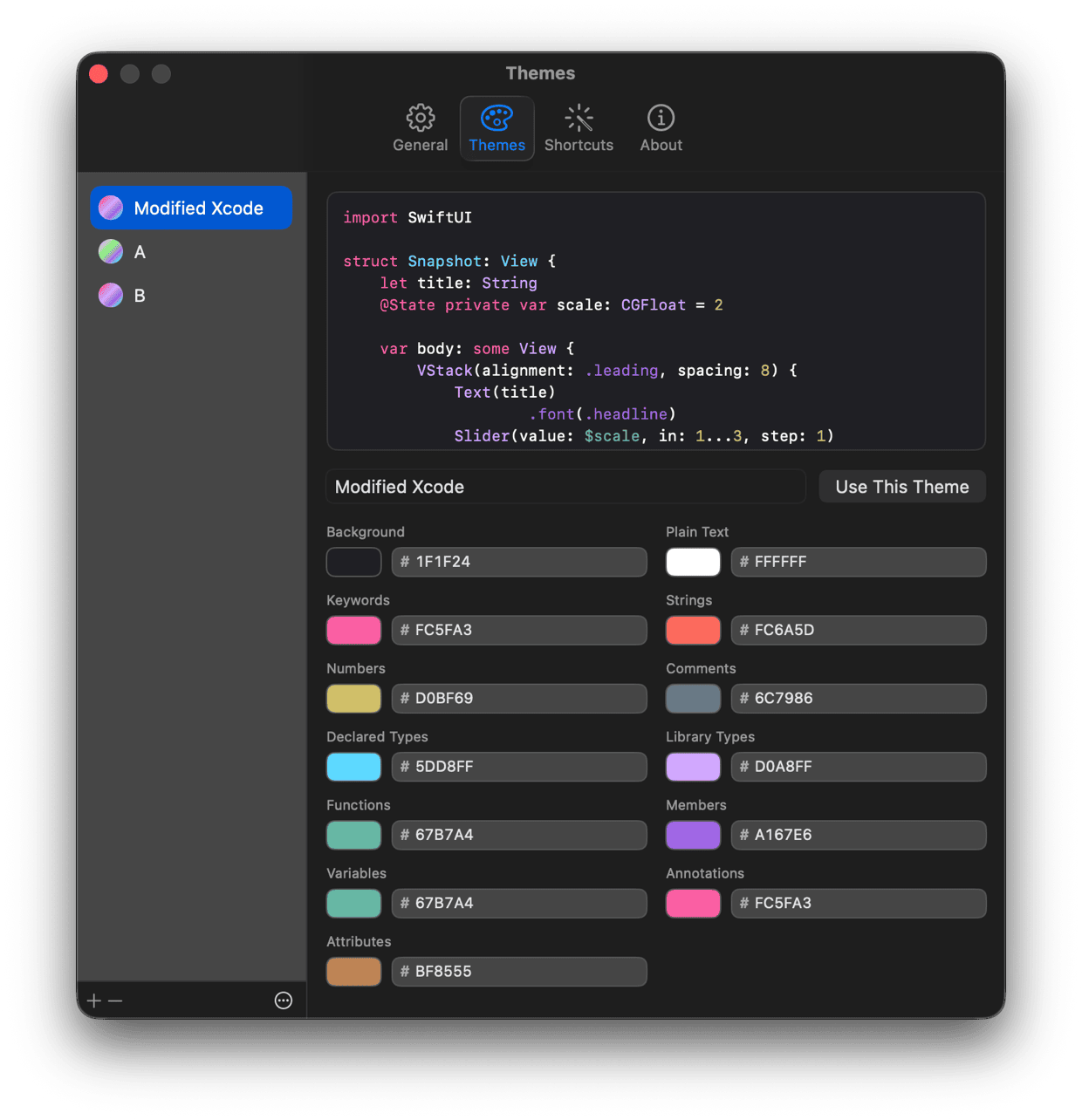
New
Now on iPhone
The same app, on the device the code usually ends up being shared from. Paste from the clipboard in one tap, pick a theme and a ratio, and export straight into the share sheet. One purchase covers both — buy it once and it is on your Mac and your iPhone.
How it works on iPhone

Shortcuts · Mac
Skip the App Entirely
On the Mac, Codeshot adds a Make Snapshot action to the Shortcuts app. Copy code, press a key, paste the picture — the app never opens. Or right-click a file in Finder and get a PNG beside it.
See the four workflows
What Developers Say About Codeshot
“Pretty handy tool for us devs that share code.”
“Like this one, simple yet powerful 👍, minimizing the time to remember what was the web page I used to generate this screenshot”
“Thank @sarunw for a beautiful code block from @CodeshotApp ❤️”
“Great app ✅”
“This is so great 👏🏻👌🏻”
“This looks nice! I’ll give it a try 😊”
“Buy it, it's worth it to quickly put something together for Twitter.”
“The App is AWESOME… I'm banging out great looking Swifty looking images now.”
“Definitely worth it if you share even just a few screenshots of code snippits. I love the range of options for themes and the customization for window size.”
Frequently Asked Questions
What is Codeshot?
Codeshot is a native Mac and iPhone app that turns code snippets into images you can share on social media. It runs on your device — no web page, no upload.
How do I turn a code snippet into an image?
Copy your code, paste it into Codeshot with ⌘⇧V, pick a theme and a backdrop, then export with ⌘S.
Which programming languages are supported?
60 languages. Codeshot detects the language from the code you paste, or you can set it yourself.
How many themes are included?
30 syntax themes, and every one of them has a light and a dark variant.
Can I make my own theme?
Yes, on the Mac. In Settings → Themes you can add a theme and set every colour yourself — background, plain text, keywords, strings, numbers, comments, declared and library types, functions, members, variables, annotations, and attributes — with a live preview as you pick. Your themes sit alongside the 30 built-in ones, and export to a file so you can move one between Macs or share it.
What image sizes can I export?
The size can follow your content, or you can lock it to a ratio — 1:1, 4:3, 3:2, 16:9, 9:16, 2:3, or 3:4. Export at 1×, 2×, or 3×, and what you see in the app is what gets exported.
Can I use my own font?
Yes. Codeshot can use any monospace font installed on your system.
How is Codeshot different from Carbon.now.sh?
Codeshot is inspired by Carbon.now.sh, but it is a native app built around perfectly centered code, macOS wallpaper backdrops, and real-time ratio presets.
Does it support dark mode?
Yes. The app automatically adjusts its appearance from light to dark along with the system.
What do I need to run Codeshot?
A Mac or an iPhone. It is one purchase for both, so downloading it on one gets you the other.
Your Next Snippet Deserves a Better Frame
Paste, style, export. Codeshot keeps the distance between writing code and sharing it as short as possible.
DownloadOn the App Store · One purchase for Mac and iPhone
Free resources
Read Before Your Next Post
Guide
The Best Image Size for Code Snippets on X (Twitter)
1600 × 900 at 16:9 — and the settings to get there in one go.
Guide
The Best Image Size for Code Snippets on LinkedIn
1080 × 1080 at 1:1 — and the settings to get there in one go.
Guide
The Best Image Size for Code Snippets on Facebook
1080 × 1080 at 1:1 — and the settings to get there in one go.